DORA Metrics for Architects: Stop Guessing, Start Measuring
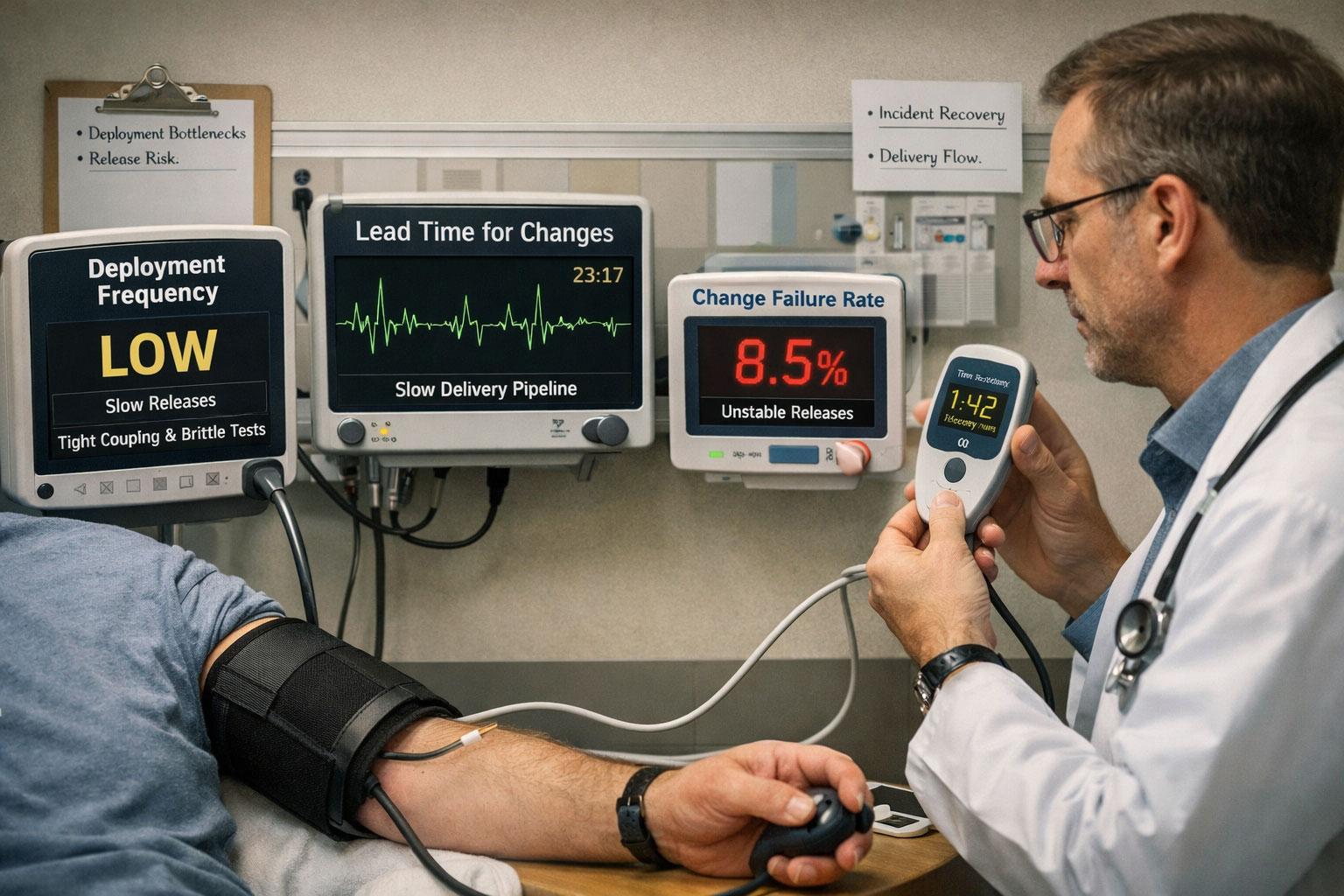
The VP of Engineering leaned back in his chair, staring at the quarterly review slides. "Our deployment velocity is... fine," he said, the pause doing more work than the word. The solution architect in the room shifted uncomfortably. They'd just spent six months redesigning the entire deployment pipeline, introducing service mesh, implementing GitOps, and evangelizing microservices. But "fine"? That stung. The technology choices were solid. The problem was nobody could prove it.
This is the architect's silent nightmare: building elegant systems that may or may not be moving the needle. You can draw beautiful diagrams, write comprehensive ADRs, and champion best practices, but if you can't measure the impact, you're essentially flying blind with a really nice cockpit.
Why Architects Need Numbers Too
Architecture decisions have consequences measured in weeks and quarters, but most architects never see the scoreboard. DORA metrics change that.
Architects often focus on theoretical quality while the business bleeds from practical inefficiency. We obsess over coupling, cohesion, and SOLID principles (all important) but rarely connect those decisions to outcomes that matter to the organization. How long does it take to ship a feature? How often do deployments fail? When things break, how quickly can we recover?
DORA metrics (named after the DevOps Research and Assessment team, now part of Google Cloud) give architects a common language to bridge this gap. Beyond DevOps and SRE, they serve as architecture health indicators. Your architectural decisions directly influence these numbers, whether you're tracking them or not.
Think of DORA Metrics as Your System's Vital Signs
Numbers without context are noise. Before diving into each metric, it helps to understand what they collectively represent and why the analogy matters.
When you go to the doctor, they don't just ask how you feel. They check your blood pressure, heart rate, temperature, and oxygen levels. These vital signs reveal what's actually happening beneath the surface. DORA metrics work the same way for your software delivery system.
Just as a doctor uses vital signs to spot problems before they become critical, DORA metrics help you identify architectural friction before it becomes a crisis. High blood pressure might indicate stress or diet issues; low deployment frequency might indicate tight coupling or brittle tests. The metrics don't tell you what to fix, but they tell you where to look.
The Five Metrics of Software Delivery
DORA originally identified four key metrics that distinguish high-performing teams from everyone else. In 2025, a fifth metric was added: Rework Rate. Let's break them all down from an architect's perspective.
Deployment Frequency: How Often You Ship
This measures how frequently your organization successfully releases to production. Elite performers deploy multiple times per day. Low performers? Once per month to once every six months.
As an architect, you should care because deployment frequency is a direct measure of how much friction exists in your architecture. If deploying is painful, teams deploy less. If deploying is easy, they deploy more. Your architectural choices (monolith vs. microservices, database coupling, deployment dependencies) directly impact this number.
The following patterns reduce deployment friction:
- Independent deployability: Services that can deploy without coordinating with other teams
- Database-per-service: Reduces schema change coordination nightmares
- Feature flags: Decouples deployment from release
- Backward-compatible APIs: Allows incremental rollouts without breaking consumers
The following patterns create deployment friction:
- Shared databases: Creates deployment bottlenecks and coordination overhead
- Tight coupling: Forces synchronized deployments across multiple services
- Big bang migrations: Requires perfect orchestration (spoiler: never happens)
Lead Time for Changes: Speed from Commit to Production
This tracks the time from code commit to code successfully running in production. Elite teams measure this in hours. Low performers measure it in months.
As an architect, you should care because lead time exposes architectural bottlenecks. Long build times? Your module structure might be a mess. Slow tests? Your dependencies are probably too tangled. Deployment requires 47 steps? Your infrastructure architecture needs help.
| Lead Time Component | Architectural Impact |
|---|---|
| Build time | Module structure, dependency management |
| Test time | Coupling, test data management, service boundaries |
| Deployment time | Infrastructure automation, deployment architecture |
| Approval gates | Trust (influenced by system reliability) |
Design for fast feedback loops. This means clear boundaries, isolated testing, and infrastructure as code. Every minute added to the feedback loop is a minute developers aren't shipping value.
Change Failure Rate: How Often Deployments Cause Problems
This measures the percentage of deployments that result in degraded service or require remediation (hotfix, rollback, patch). Elite teams keep this under 15%. Low performers can exceed 45%.
As an architect, you should care because this is your architecture's reliability score. High failure rates often indicate:
- Insufficient isolation between components
- Poor error handling and resilience patterns
- Inadequate observability to catch issues before production
- Fragile deployment processes
The following patterns keep your change failure rate low:
- Circuit breakers and bulkheads: Contain failures
- Health checks and readiness probes: Prevent bad deployments from receiving traffic
- Canary deployments: Test changes with a small percentage of traffic first
- Comprehensive monitoring: Catch issues immediately
Mean Time to Recovery (MTTR): How Fast You Fix Problems
When things break (and they will), how quickly can you restore service? Elite teams recover in under an hour. Low performers need more than a week.
As an architect, you should care because MTTR reveals whether your architecture is designed for failure or pretends failure won't happen. Systems designed for fast recovery have:
- Clear service boundaries (easy to identify the problem)
- Good observability (easy to diagnose the problem)
- Simple rollback mechanisms (easy to fix the problem)
- Automated deployment pipelines (easy to deploy the fix)
MTTR is an architecture quality metric, not just an operations concern. If your system takes days to recover from failures, your architecture is the problem.
Rework Rate: The Hidden Productivity Tax (New in 2025)
The DORA 2025 report added a fifth metric: the ratio of unplanned deployments that happen because something you just shipped broke in production. Emergency patches, "we just released this yesterday and need to fix it" hotfixes, and quick corrections all count.
As an architect, you should care because the original four metrics track throughput and major failures well, but miss the quieter cost of going back to fix things that just went out the door. A team can score well on deployment frequency and MTTR while spending 30% of its capacity cleaning up after itself. The 2025 data shows that most teams fall in the 8-32% rework range, and only 7.3% report rework rates below 2%.
With AI-assisted development increasingly common (90% of respondents in the 2025 report use AI tools daily), rework rate has become especially relevant. AI code generation can increase throughput while simultaneously increasing rework, because the code ships fast but may be subtly wrong.
The following patterns help keep your rework rate low:
- Strong contract testing: Catches integration issues before production, not after
- Comprehensive observability: Surfaces misbehaving code before users report it
- Staged rollouts: Canary and blue/green deployments limit the blast radius of "almost right" code
- Design-for-testability: Components with clear inputs and outputs are easier to verify automatically
The following patterns drive your rework rate up:
- God services with many responsibilities: One change touches many behaviors, increasing the chance of unintended side effects
- Missing integration test coverage: Unit tests pass, but the pieces don't fit together
- Long-lived feature branches: Code diverges from main for weeks, then merges explosively
The 2025 DORA report established the following benchmarks for rework rate:
| Performance Level | Rework Rate |
|---|---|
| Elite | < 2% |
| High | 2-8% |
| Medium | 8-20% |
| Low | > 20% |
How to Actually Use These Metrics
Knowing what the metrics mean is the easy part. Actually getting numbers is where most teams stall. These steps are designed to get you from zero to a working baseline without waiting for budget approval or a new platform rollout.
Step 1: Start Measuring Locally (Without a Platform)
You don't need expensive tooling to establish a baseline. If your team uses Git tags or branch naming conventions for production deployments, you can calculate the first two metrics right now from your terminal.
Deployment Frequency from git tags
If your team tags production releases (e.g., release/* or v1.2.3), count how many happened in the last 30 days:
git fetch --tags
git log --tags --simplify-by-decoration --pretty="format:%D %ci" \
  --since="30 days ago" \
  | grep -E "tag: (v|release)" \
  | wc -l
Divide by 30 to get deployments per day, or by 4 to get deployments per week.
Lead Time from commit to release tag
This script calculates the average time between when commits were authored and when the next release tag was created. Run it in your repo:
#!/bin/bash
# Save as dora-lead-time.sh and run: bash dora-lead-time.sh

RELEASE_TAGS=$(git tag --sort=-creatordate | grep -E "^(v[0-9]|release)" | head -10)

total_hours=0
count=0

while IFS= read -r tag; do
  tag_date=$(git log -1 --format="%ct" "$tag")
  prev_tag=$(git describe --tags --abbrev=0 "$tag"^ 2>/dev/null)

  if [ -n "$prev_tag" ]; then
    commits=$(git log "$prev_tag..$tag" --format="%ct")
    while IFS= read -r commit_ts; do
      diff=$(( (tag_date - commit_ts) / 3600 ))
      total_hours=$((total_hours + diff))
      count=$((count + 1))
    done <<< "$commits"
  fi
done <<< "$RELEASE_TAGS"

if [ "$count" -gt 0 ]; then
  avg=$(( total_hours / count ))
  echo "Average lead time: ${avg} hours across ${count} commits"
  echo "That is approximately $(( avg / 24 )) days"
fi
Change Failure Rate (manual tally)
Not everything can be scripted from git alone. For now, track hotfixes and rollbacks in a simple spreadsheet or a markdown file in your repo:
# Count tags that look like hotfixes
git tag | grep -iE "(hotfix|patch|rollback)" | wc -l
Divide by total release count for the same period. Even a rough number is better than no number.
MTTR (manual tally)
Track time from when an incident is reported to when a fix is deployed. A Markdown file in the repo works fine to start:
| Date       | Incident                  | Detected | Resolved | Hours |
|------------|---------------------------|----------|----------|-------|
| 2026-03-15 | Payment service timeout   | 14:02    | 16:45    | 2.7   |
| 2026-03-28 | Auth token expiry bug     | 09:15    | 10:30    | 1.25  |
Precision comes later. Start by establishing a baseline.
Tools to Consider
Once your manual baseline makes the case for investing in proper measurement, there are good options at every budget level.
Free and open source
- dora-the-explora, Python scripts that compute all four classic DORA metrics from your GitHub or GitLab data
- github-dora-metrics, instant, badge-ready DORA metrics for any GitHub repository
- DevOpsMetrics, .NET-based project that pulls metrics from GitHub and Azure DevOps
Built into your existing platform
- GitHub, Deployment Frequency and Lead Time are available natively via GitHub Insights and the DORA GitHub Action in the Marketplace
- GitLab, DORA metrics are built into GitLab's Value Stream Analytics dashboard (available from GitLab 13.x onwards)
- Azure DevOps, Lead time and deployment frequency surface through the Analytics views
Dedicated DORA platforms
- Faros AI, tracks all five metrics including Rework Rate, with AI-assisted root cause analysis
- Swarmia, focused on engineering effectiveness with strong DORA support and team-level breakdowns
- LinearB, combines DORA metrics with sprint data and engineering benchmarks
- Oobeya, flow metrics and DORA in a single dashboard, with Jira and GitHub integrations
Start with what you already have. Most teams on GitHub or GitLab can get meaningful numbers without spending anything.
Step 2: Identify Your Bottleneck
Look at your worst metric. That's where your architecture is screaming for help.
Scenario: Low deployment frequency (once per sprint)
- Investigate: What makes deployment scary?
- Common culprits: Tight coupling, shared databases, manual processes
- Architectural fix: Introduce service boundaries, implement feature flags, automate deployments
Scenario: High change failure rate (30%+)
- Investigate: What's breaking and why?
- Common culprits: Poor error handling, insufficient testing, weak isolation
- Architectural fix: Add resilience patterns, improve observability, strengthen boundaries
Step 3: Connect Architecture Decisions to Metrics
When proposing architectural changes, frame them in terms of DORA metrics:
Weak: "We should adopt microservices because monoliths are bad."
Strong: "Our current deployment frequency is once per two weeks, and our lead time is 12 days. By extracting the payment service, we can deploy payment features independently, potentially doubling our deployment frequency for that domain and reducing lead time to 2-3 days."
This transforms architecture discussions from religious debates into data-driven decisions.
Step 4: Track Trends, Not Absolutes
Don't obsess over hitting "elite performer" numbers. Focus on improvement:
- Are we deploying more frequently than last quarter?
- Is our lead time decreasing?
- Are we recovering faster from incidents?
A team that moves from "low" to "medium" performance has achieved more than a team that stays "elite" but stagnant.
Step 5: Use Metrics to Validate Architectural Hypotheses
Treat architectural changes as experiments:
- Measure baseline metrics
- Implement architectural change
- Measure metrics after change
- Evaluate impact
Example: You hypothesize that introducing a service mesh will improve MTTR by providing better observability.
- Before: MTTR averages 4 hours
- After implementation: MTTR averages 2.5 hours
- Conclusion: Hypothesis validated (or not; either way, you learned something)
What DORA 2025 Says About AI
The 2025 State of DevOps report (drawing from nearly 5,000 technology professionals) surfaced a pattern that architects need to understand before they sign off on AI tooling strategies.
AI is an amplifier. For teams with solid architecture, good test coverage, and disciplined processes, AI accelerates delivery and improves several DORA metrics. For teams with tangled codebases, weak observability, and brittle pipelines, AI magnifies those problems. It ships code faster into a system that can't absorb it safely.
The specific patterns the 2025 data revealed:
- Deployment frequency improved for teams using AI coding assistants, because code gets written and reviewed faster
- Change failure rate and rework rate increased for those same teams, because "almost right" code ships at higher velocity
- Platform quality became a multiplier: 90% of organizations now have internal developer platforms, but only high-quality platforms amplified AI's benefits. AI on a low-quality platform produced negligible gains
The architectural implication: if you're evaluating AI coding tools for your team, first check your change failure rate and rework rate. If they're already high, adding AI will likely raise them further. Fix the architecture and delivery pipeline first, then introduce AI as an accelerator on a stable foundation.
Things Architects Don't Want to Hear
Measurement is uncomfortable when the data contradicts your assumptions. Here are four truths that DORA metrics tend to surface.
Truth #1: Your beautiful architecture might be slowing everyone down.
That elegant microservices design with perfect domain boundaries? If it requires coordinating 15 services for a simple feature, your deployment frequency is suffering.
Truth #2: Sometimes the "right" architectural decision hurts DORA metrics short-term.
Paying down technical debt or refactoring for better boundaries might temporarily increase lead time and reduce deployment frequency. That's okay. Measure the trend over quarters, not weeks.
Truth #3: DORA metrics can be gamed.
Deploying configuration changes 50 times a day doesn't make you elite. It makes you a cheater. The metrics work when you measure honestly and use them to drive real improvement.
Truth #4: Not all improvements come from architecture.
Sometimes the bottleneck is process, culture, or tooling. DORA metrics help you identify the constraint, but the solution might not be architectural.
When DORA Metrics Lie to You
Metrics can be gamed, misread, or applied without enough context. Before you present numbers to leadership or use them to justify an architectural overhaul, understand where these metrics break down.
DORA metrics are powerful, but they're not magic. Watch out for:
- Vanity deployments: Deploying trivial changes to inflate deployment frequency. Fix by tracking deployment frequency for meaningful changes only.
- Cherry-picked metrics: Only measuring your best team or service. Fix by measuring across all teams and services, report averages and outliers.
- Ignoring context: Comparing a team building a real-time trading system to a team building a content management system. Fix by benchmarking against your own past performance, not others
- Metric tunnel vision: Optimizing deployment frequency at the expense of stability. Fix by tracking all five metrics together, as they balance each other.
Your Architecture Scorecard
DORA metrics give architects something we've desperately needed: objective feedback on whether our decisions are helping or hurting. They transform architecture from an art into an engineering discipline.
Here's what to remember:
- Measure honestly: Start with imperfect data rather than waiting for perfect instrumentation
- Focus on trends: Improvement matters more than absolute numbers
- Connect decisions to outcomes: Frame architectural proposals in terms of metric impact
- Track all five metrics: The 2025 addition of rework rate closes the blind spot around quiet productivity loss
- Check your baseline before adding AI: AI amplifies what's already there, for better or worse
The next time someone asks whether your architectural decision was worth it, you'll have an answer backed by data. And the next time your VP of Engineering reviews quarterly results, "fine" won't cut it anymore. You'll have numbers showing exactly how much better things have gotten.
Which of your architectural decisions from the last year actually improved delivery performance? How would you know? And more importantly: what are you going to measure differently starting tomorrow?
Share this article
Related articles

Architecture Capability Framework: Scoring Your Own Practice
Score your architecture practice against TOGAF's Architecture Capability Framework, not the business, with a maturity model you can defend to a CIO.

Data Mesh: Decentralization Without the Anarchy
Inside a single telco, "Service" means four different things across four different teams. This is the problem data mesh was built to solve and why getting the canonical model right matters more than any platform decision.

Architecture Tradeoff Analysis: Picking Your Poison (Carefully)
Most architecture debates are not about the wrong answer. They are about tradeoffs nobody made explicit. ATAM is the method that forces both pans of the scale to be loaded before anyone decides.
Enjoyed this article?
Subscribe to get more insights delivered to your inbox monthly
No spam, unsubscribe anytime.
This site is protected by reCAPTCHA and the Google Privacy Policy and Terms of Service apply.