Event Sourcing: A History Lesson Your Database Actually Wants
Over the past few years I've repeatedly landed in the same conversation with clients. A project is going well, the architecture is solid, and then someone in the governance or compliance team asks the question: "Can you show us a full audit trail of who changed what, and when?" Sometimes it comes from a security officer doing a pen test review. Sometimes it comes from a regulator. Once it came from a legal team, mid-incident, needing to reconstruct a chain of events before a court deadline. Every time, the answer from the development team was some variation of "we store the current state, so we can see what it is now, but not how it got there."
That gap, between what your system knows now and what actually happened, is exactly the problem Event Sourcing is designed to close. Event Sourcing is a pattern where an application stores every state change as an immutable event in an append-only log, and derives current state by replaying those events. I started recommending it not as an architectural curiosity, but as a practical response to a requirement I kept encountering: full, tamper-evident, queryable history of every state change in the application. This article walks through the pattern, when to use it, and how to implement it in a way you can follow on your own workstation.
The State of Affairs
Traditional databases operate on a simple principle: store the current truth. Your customer's address is "123 Main Street." Update it to "456 Oak Avenue," and poof, "123 Main Street" disappears into the digital ether. This works brilliantly for many scenarios, but it creates a fundamental problem: you've lost context.
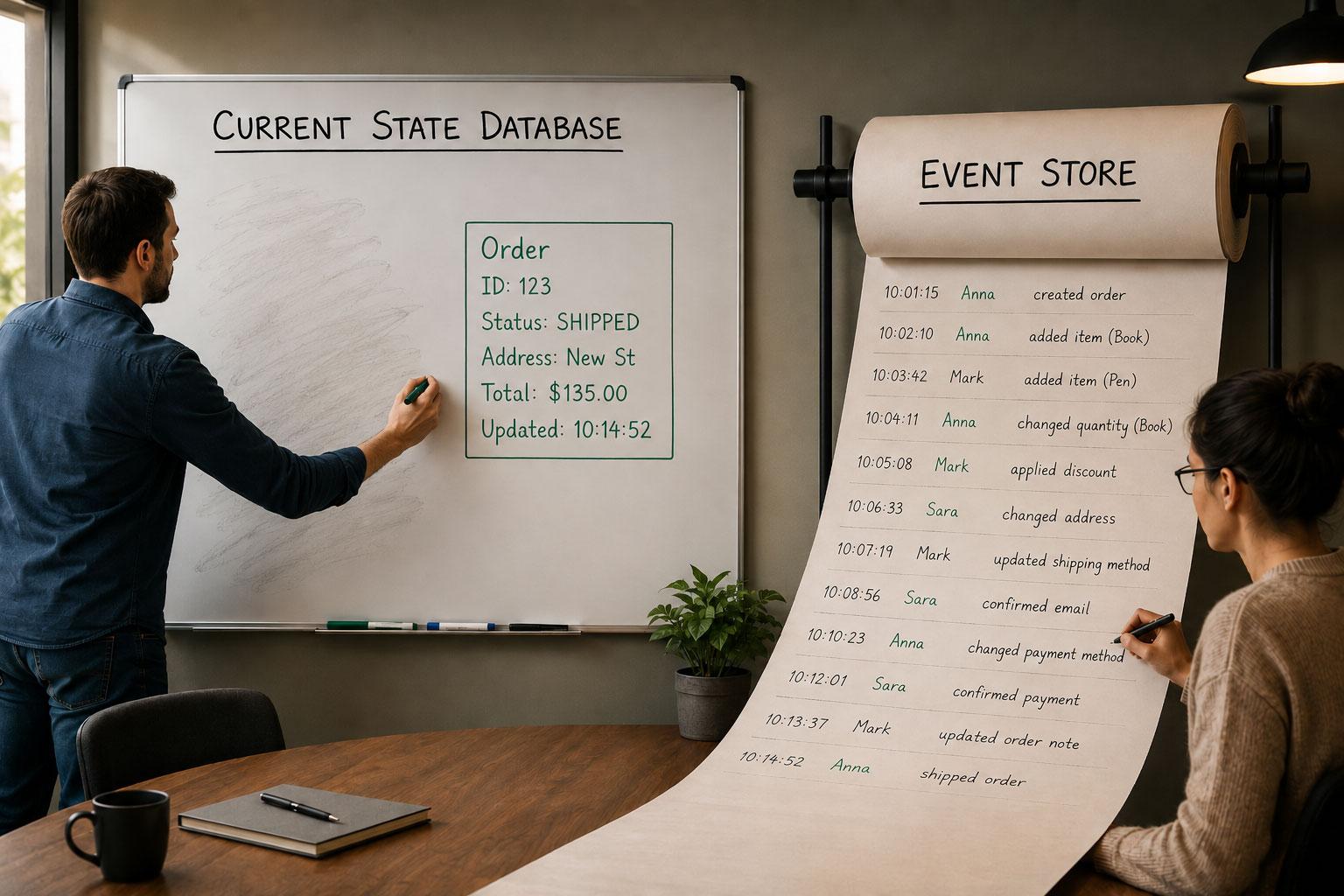
Think of it like a whiteboard in a meeting room. A traditional database works the way most whiteboards do: you erase the old content and write the new state. At any moment the board shows one thing, the current truth. But if someone walks in after the meeting and asks what decisions were made, or who changed the plan halfway through, the whiteboard has no answer. Event Sourcing is like replacing that whiteboard with a roll of paper that keeps feeding forward. Nothing gets erased. Every change is written as a new line, in order, with a timestamp and a name. The current state is still visible, but so is everything that led to it.
Event Sourcing flips this model on its head. Instead of storing the current state, you store every state change as an immutable event. Your database becomes a ledger, a chronicle, a time machine. Want to know the current state? Read all the events and replay them. Need to know what happened last Tuesday? Read the events up to that point. Suspicious about a change? The event is right there, timestamped, immutable, and waiting to tell its story.
The pattern treats your application's state as the sum of all events that have occurred, captured in an append-only log. Each event represents a fact, something that happened in the past tense: "CustomerAddressChanged," "OrderPlaced," "PaymentProcessed." These are historical records, as unchangeable as yesterday's weather.
The Event Log Chronicles
Event Sourcing rests on several foundational principles that distinguish it from traditional state management.
Events as the Source of Truth
In Event Sourcing, events are the source of truth. Each event captures:
- What happened: The business fact (OrderPlaced, InventoryAdjusted)
- When it happened: Precise timestamp
- Who made it happen: User or system identifier
- Relevant details: The data needed to understand and replay the change
public record OrderPlacedEvent
{
    public Guid OrderId { get; init; }
    public Guid CustomerId { get; init; }
    public DateTime OccurredAt { get; init; }
    public decimal TotalAmount { get; init; }
    public required string PlacedBy { get; init; }
}
The Append-Only Log
Your event store is write-only in the sense that events are never updated or deleted. You append new events, period. If you need to correct a mistake, you don't edit the erroneous event; you add a new compensating event.
Made an accounting error? Don't change the original transaction. Add an "AccountingCorrectionApplied" event. This preserves the complete history, including the mistake and its correction, which is often exactly what auditors and regulators want to see.
State Reconstruction Through Replay
Current state is derived, not stored (well, not primarily stored). To determine an order's current status, you replay all events for that order:
public class Order
{
    public Guid Id { get; private set; }
    public OrderStatus Status { get; private set; }
    public decimal TotalAmount { get; private set; }

    public static Order FromEvents(IEnumerable<(string EventType, string EventData, int Version, string OccurredAt)> events)
    {
        var order = new Order();
        foreach (var (eventType, eventData, _, _) in events)
        {
            switch (eventType)
            {
                case nameof(OrderPlacedEvent):
                    var placed = JsonSerializer.Deserialize<OrderPlacedEvent>(eventData)!;
                    order.Id = placed.OrderId;
                    order.Status = OrderStatus.Placed;
                    order.TotalAmount = placed.TotalAmount;
                    break;
                case nameof(OrderShippedEvent):
                    order.Status = OrderStatus.Shipped;
                    break;
                case nameof(OrderCancelledEvent):
                    order.Status = OrderStatus.Cancelled;
                    break;
            }
        }
        return order;
    }
}
Temporal Queries
Because you have the complete history, you can query state at any point in time. What did the customer's profile look like six months ago? Replay events up to that date. This temporal dimension transforms debugging, auditing, and analytics from guesswork into precision.
The Architect's Toolkit
Event Sourcing shines in specific scenarios. Understanding these use cases helps you avoid the trap of applying it everywhere (spoiler: you shouldn't).
Ideal Candidates
| Scenario | Why Event Sourcing Helps | Example |
|---|---|---|
| Audit Requirements | Complete, immutable history for compliance | Financial transactions, healthcare records |
| Complex Business Processes | Track state transitions through multi-step workflows | Order fulfillment, loan applications |
| Temporal Analysis | Understand how state evolved over time | Pricing history, inventory trends |
| Debugging Production Issues | Replay events to reproduce exact conditions | Investigating why an account balance is incorrect |
| Event-Driven Architecture | Events are already core to your design | Microservices communicating via events |
When to Think Twice
Event Sourcing adds complexity. Skip it when:
- Your domain is simple CRUD with no audit requirements
- You don't need historical state
- Your team lacks experience with event-driven patterns
- Performance of simple queries is critical (event replay has overhead)
- You're dealing with frequently updated aggregates with thousands of events
The Snapshot Strategy
Replaying 10,000 events every time you need current state gets expensive. Enter snapshots: periodic captures of current state that serve as replay starting points.
public class OrderSnapshot
{
    public Guid OrderId { get; init; }
    public int EventVersion { get; init; }  // last event included in this snapshot
    public OrderStatus Status { get; init; }
    public decimal TotalAmount { get; init; }
    public DateTime SnapshotCreatedAt { get; init; }
}

public class OrderRepository
{
    public Order GetOrder(Guid orderId)
    {
        var snapshot = _snapshotStore.GetLatestSnapshot(orderId);
        var events = _eventStore.GetEvents(orderId, fromVersion: snapshot.EventVersion);
        var order = Order.FromSnapshot(snapshot);
        foreach (var @event in events)
            order.Apply(@event);
        return order;
    }
}
Snapshot every 100 events, or every hour, or based on aggregate size. The strategy depends on your read patterns and performance requirements.
Rolling Up Your Sleeves
The following steps walk you through building a minimal but complete Event Sourcing implementation in C# on your local machine. You need the .NET 9 SDK installed. No cloud account or external service is required at this stage.
Step 1: Create the project
Open a terminal and run:
dotnet new console -n EventSourcingDemo
cd EventSourcingDemo
dotnet add package Microsoft.Data.Sqlite --version 10.0.8
dotnet add package Dapper --version 2.1.79
This gives you a console app with a local SQLite database as the event store. SQLite requires no server and stores everything in a single file, which makes it ideal for learning the pattern before introducing a production-grade store.
Step 2: Define your events
Create a file Events.cs. Events are the contract you make with the future: once written, they never change. Name them in the past tense and include everything a reader needs to understand what happened.
// Events.cs
public record OrderPlacedEvent
{
    public Guid OrderId { get; init; }
    public Guid CustomerId { get; init; }
    public DateTime OccurredAt { get; init; }
    public decimal TotalAmount { get; init; }
    public required string PlacedBy { get; init; }
}

public record OrderShippedEvent
{
    public Guid OrderId { get; init; }
    public DateTime OccurredAt { get; init; }
    public required string TrackingNumber { get; init; }
}

public record OrderCancelledEvent
{
    public Guid OrderId { get; init; }
    public DateTime OccurredAt { get; init; }
    public required string Reason { get; init; }
    public required string CancelledBy { get; init; }
}
Notice that CustomerUpdatedEvent does not appear here. A generic "something changed" event loses business meaning and makes projections much harder to build later.
Step 3: Create the event store table
Create a file EventStore.cs. The store is an append-only table: rows are inserted, never updated or deleted.
// EventStore.cs
using Microsoft.Data.Sqlite;
using Dapper;
using System.Text.Json;

public class EventStore
{
    private readonly string _connectionString;

    public EventStore(string connectionString)
    {
        _connectionString = connectionString;
        InitialiseSchema();
    }

    private void InitialiseSchema()
    {
        using var conn = new SqliteConnection(_connectionString);
        conn.Execute(@"
            CREATE TABLE IF NOT EXISTS EventStore (
                EventId     TEXT PRIMARY KEY,
                AggregateId TEXT NOT NULL,
                EventType   TEXT NOT NULL,
                EventData   TEXT NOT NULL,
                EventVersion INTEGER NOT NULL,
                OccurredAt  TEXT NOT NULL,
                UserId      TEXT
            );
            CREATE INDEX IF NOT EXISTS IX_Aggregate
                ON EventStore (AggregateId, EventVersion);
        ");
    }

    public void Append(string aggregateId, object @event, string? userId = null)
    {
        using var conn = new SqliteConnection(_connectionString);

        var nextVersion = conn.ExecuteScalar<int>(
            "SELECT COALESCE(MAX(EventVersion), 0) + 1 FROM EventStore WHERE AggregateId = @aggregateId",
            new { aggregateId });

        conn.Execute(@"
            INSERT INTO EventStore (EventId, AggregateId, EventType, EventData, EventVersion, OccurredAt, UserId)
            VALUES (@EventId, @AggregateId, @EventType, @EventData, @EventVersion, @OccurredAt, @UserId)",
            new
            {
                EventId = Guid.NewGuid().ToString(),
                AggregateId = aggregateId,
                EventType = @event.GetType().Name,
                EventData = JsonSerializer.Serialize(@event),
                EventVersion = nextVersion,
                OccurredAt = DateTime.UtcNow.ToString("o"),
                UserId = userId
            });
    }

    public IEnumerable<(string EventType, string EventData, int Version, string OccurredAt)> GetEvents(string aggregateId)
    {
        using var conn = new SqliteConnection(_connectionString);
        return conn.Query<(string, string, int, string)>(
            "SELECT EventType, EventData, EventVersion, OccurredAt FROM EventStore WHERE AggregateId = @aggregateId ORDER BY EventVersion",
            new { aggregateId });
    }
}
Step 4: Build the aggregate with state reconstruction
Create a file Order.cs. The aggregate does not store state in the database; it rebuilds state by replaying its events.
// Order.cs
using System.Text.Json;

public enum OrderStatus { Placed, Shipped, Cancelled }

public class Order
{
    public Guid Id { get; private set; }
    public OrderStatus Status { get; private set; }
    public decimal TotalAmount { get; private set; }

    public static Order FromEvents(IEnumerable<(string EventType, string EventData, int Version, string OccurredAt)> events)
    {
        var order = new Order();
        foreach (var (eventType, eventData, _, _) in events)
        {
            switch (eventType)
            {
                case nameof(OrderPlacedEvent):
                    var placed = JsonSerializer.Deserialize<OrderPlacedEvent>(eventData)!;
                    order.Id = placed.OrderId;
                    order.Status = OrderStatus.Placed;
                    order.TotalAmount = placed.TotalAmount;
                    break;
                case nameof(OrderShippedEvent):
                    order.Status = OrderStatus.Shipped;
                    break;
                case nameof(OrderCancelledEvent):
                    order.Status = OrderStatus.Cancelled;
                    break;
            }
        }
        return order;
    }
}
Step 5: Wire it up in Program.cs
Replace the contents of Program.cs with the following. This simulates placing, shipping, and then attempting to cancel an already-shipped order.
// Program.cs
var store = new EventStore("Data Source=events.db");

var orderId = Guid.NewGuid().ToString();
var customerId = Guid.NewGuid().ToString();

// Place an order
store.Append(orderId, new OrderPlacedEvent
{
    OrderId = Guid.Parse(orderId),
    CustomerId = Guid.Parse(customerId),
    OccurredAt = DateTime.UtcNow,
    TotalAmount = 149.99m,
    PlacedBy = "alice@example.com"
}, userId: "alice@example.com");

Console.WriteLine("Order placed.");

// Ship the order
store.Append(orderId, new OrderShippedEvent
{
    OrderId = Guid.Parse(orderId),
    OccurredAt = DateTime.UtcNow,
    TrackingNumber = "TRK-20260608-001"
}, userId: "warehouse-system");

Console.WriteLine("Order shipped.");

// Reconstruct state and check before attempting cancel
var events = store.GetEvents(orderId);
var order = Order.FromEvents(events);

Console.WriteLine($"\nCurrent order status: {order.Status}");

if (order.Status == OrderStatus.Shipped)
{
    Console.WriteLine("Cannot cancel: order already shipped. A compensating event would be appended instead.");
}

// Print the full audit trail directly from the event store
Console.WriteLine("\n--- Audit Trail ---");
foreach (var (eventType, _, version, occurredAt) in store.GetEvents(orderId))
{
    Console.WriteLine($"v{version}  {occurredAt}  {eventType}");
}
Run the application:
dotnet run
You should see output like:
Order placed.
Order shipped.

Current order status: Shipped
Cannot cancel: order already shipped. A compensating event would be appended instead.

--- Audit Trail ---
v1  2026-06-08T09:14:22.000Z  OrderPlacedEvent
v2  2026-06-08T09:14:22.001Z  OrderShippedEvent
The audit trail comes directly from the event store. There is no separate logging system, no trigger, no after-the-fact reconstruction: the history is the data.
Step 6: Add a read model with a projection
Reading from the event log on every query gets expensive at scale. Build a projection: a separate, denormalised table that stays in sync with the event stream and answers read queries instantly.
Add a Projection.cs file:
// Projection.cs
using Microsoft.Data.Sqlite;
using Dapper;
using System.Text.Json;

public class OrderSummaryProjection
{
    private readonly string _connectionString;


    public OrderSummaryProjection(string connectionString)
    {
        _connectionString = connectionString;
        using var conn = new SqliteConnection(connectionString);
        conn.Execute(@"
            CREATE TABLE IF NOT EXISTS OrderSummary (
                OrderId     TEXT PRIMARY KEY,
                CustomerId  TEXT NOT NULL,
                Status      TEXT NOT NULL,
                TotalAmount REAL NOT NULL,
                LastUpdated TEXT NOT NULL
            )");
    }


    public void Project(string eventType, string eventData)
    {
        using var conn = new SqliteConnection(_connectionString);
        switch (eventType)
        {
            case nameof(OrderPlacedEvent):
                var placed = JsonSerializer.Deserialize<OrderPlacedEvent>(eventData)!;
                conn.Execute(@"
                    INSERT OR REPLACE INTO OrderSummary (OrderId, CustomerId, Status, TotalAmount, LastUpdated)
                    VALUES (@OrderId, @CustomerId, 'Placed', @TotalAmount, @Now)",
                    new { OrderId = placed.OrderId.ToString(), CustomerId = placed.CustomerId.ToString(), placed.TotalAmount, Now = DateTime.UtcNow.ToString("o") });
                break;
            case nameof(OrderShippedEvent):
                var shipped = JsonSerializer.Deserialize<OrderShippedEvent>(eventData)!;
                conn.Execute("UPDATE OrderSummary SET Status = 'Shipped', LastUpdated = @Now WHERE OrderId = @OrderId",
                    new { OrderId = shipped.OrderId.ToString(), Now = DateTime.UtcNow.ToString("o") });
                break;
            case nameof(OrderCancelledEvent):
                var cancelled = JsonSerializer.Deserialize<OrderCancelledEvent>(eventData)!;
                conn.Execute("UPDATE OrderSummary SET Status = 'Cancelled', LastUpdated = @Now WHERE OrderId = @OrderId",
                    new { OrderId = cancelled.OrderId.ToString(), Now = DateTime.UtcNow.ToString("o") });
                break;
        }
    }
}
Now replace Program.cs with a version that wires up the projection alongside the event store:
// Program.cs
using Dapper;
using Microsoft.Data.Sqlite;

var store = new EventStore("Data Source=events.db");
var projection = new OrderSummaryProjection("Data Source=events.db");

var orderId = Guid.NewGuid().ToString();
var customerId = Guid.NewGuid().ToString();

void AppendAndProject(string aggregateId, object @event, string? userId = null)
{
    store.Append(aggregateId, @event, userId);
    projection.Project(@event.GetType().Name, System.Text.Json.JsonSerializer.Serialize(@event));
}

AppendAndProject(orderId, new OrderPlacedEvent
{
    OrderId = Guid.Parse(orderId),
    CustomerId = Guid.Parse(customerId),
    OccurredAt = DateTime.UtcNow,
    TotalAmount = 149.99m,
    PlacedBy = "alice@example.com"
}, userId: "alice@example.com");

Console.WriteLine("Order placed.");

AppendAndProject(orderId, new OrderShippedEvent
{
    OrderId = Guid.Parse(orderId),
    OccurredAt = DateTime.UtcNow,
    TrackingNumber = "TRK-20260608-001"
}, userId: "warehouse-system");

Console.WriteLine("Order shipped.");

// Reconstruct state from events and check before attempting cancel
var events = store.GetEvents(orderId);
var order = Order.FromEvents(events);

Console.WriteLine($"\nCurrent order status: {order.Status}");

if (order.Status == OrderStatus.Shipped)
{
    Console.WriteLine("Cannot cancel: order already shipped. A compensating event would be appended instead.");
}

// Write side: full audit trail from the event store
Console.WriteLine("\n--- Audit Trail (event store) ---");
foreach (var (eventType, _, version, occurredAt) in store.GetEvents(orderId))
{
    Console.WriteLine($"v{version}  {occurredAt}  {eventType}");
}

// Read side: current state from the projection table
using var conn = new SqliteConnection("Data Source=events.db");
var summary = conn.QueryFirst(
    "SELECT OrderId, Status, TotalAmount, LastUpdated FROM OrderSummary WHERE OrderId = @orderId",
    new { orderId });

Console.WriteLine("\n--- Read Model (projection) ---");
Console.WriteLine($"OrderId:     {summary.OrderId}");
Console.WriteLine($"Status:      {summary.Status}");
Console.WriteLine($"TotalAmount: {summary.TotalAmount}");
Console.WriteLine($"LastUpdated: {summary.LastUpdated}");
Run dotnet run and you will see both sections printed. The audit trail comes from the append-only event store; the read model comes from the OrderSummary projection table. Same data, two different shapes. That is CQRS in practice.
The AppendAndProject helper keeps them in sync in a single call here. In a production system this fan-out would be driven by a message broker or an event bus rather than an in-process helper, but for a local demo this is the most direct way to observe both sides together.
The Payoff
Event Sourcing transforms how you think about data persistence:
- Capture complete history by storing every state change as an immutable event, giving you a full audit trail and the ability to reconstruct state at any point in time
- Embrace events as truth rather than treating current state as the source of authority, enabling temporal queries and perfect debugging capabilities
- Apply strategically to domains with complex workflows, audit requirements, or temporal analysis needs, but avoid over-engineering simple CRUD scenarios
- Plan for projections to maintain read performance, accepting eventual consistency between your event store and read models
The question that should guide your decision is the one I now ask at the start of every project: "Will anyone ever need to prove what happened, who did it, and when?" If the answer is yes, or even maybe, Event Sourcing is worth the additional complexity. The audit trail is a structural property of the system, and retrofitting it onto a CRUD database after the fact is far more expensive than building it in from the start.
What aspects of your system's history are you currently losing? And more importantly, what will it cost you when you need that history and it is not there?
Share this article
Related articles

Eventual Consistency in DDD: Measure the Window with Sagas
Eventual consistency in DDD works when the inconsistency window is a business number. Build a .NET saga with outbox and idempotent consumers, then alert on it.

Mutation Testing: Your Tests Are Lying and Math Can Prove It
A high coverage number can hide tests that never verify real behavior, tests that run every line without checking whether the logic is actually correct. Mutation testing exposes those gaps by deliberately breaking your code and checking whether any test notices, turning test quality into a number you can measure instead of assume.

Bulkheads: Because One Sinking Service Shouldn't Sink Them All
I watched one misconfigured service take down an entire platform because everything shared the same resource pools. Here is the bulkhead pattern that prevents it, with a working .NET 8 demo you can run locally in minutes.
Enjoyed this article?
Subscribe to get more insights delivered to your inbox monthly
No spam, unsubscribe anytime.
This site is protected by reCAPTCHA and the Google Privacy Policy and Terms of Service apply.